Approval Desk
Security
An agent that can apply a change is one prompt away from applying the wrong one. This template puts a person between the decision and the effect: the tool call stops, a form or a portal link goes to the operator, and the change API is called only if they say yes.
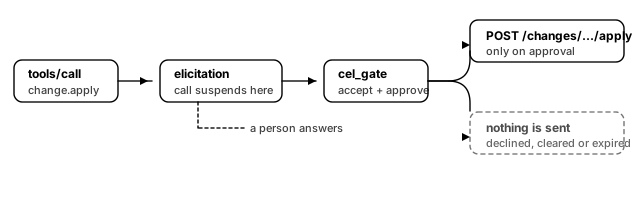
What you get
Three tools that model the same workflow at three levels of ceremony.
- **
change.preview** — read-only. Describes what a change would do. Safe to call as often as the agent likes, and the right first move every time. - **
change.apply** — asks for approval in a form, then applies. The tool call suspends while the form is open; the operator ticks a box and can leave a reason, which lands in the audit trail. - **
access.request** — asks for approval through a link to your own portal. Use this when the decision needs more context than a form can carry: a ticket, a diff, a second reviewer.
The part that is easy to get wrong, and that this template gets right:
- **
acceptalone is not consent.** A client can accept an elicitation form with the approve box cleared. The gate checks both — the action and the field — so a half-filled form does not apply anything. - A decline is not an error to route around. When the gate fails, the pipeline stops with the message written in the config, and the change API is never called. There is no partial path.
- The wait is a human wait. The elicitation timeout is ten minutes, not the sixty-second default. Sixty seconds is how long a machine will wait; ten minutes is how long it takes somebody to read a change summary.
What you need
- A change API — whatever system actually applies changes for you. You will fill in Change API host and a Change API token. Scope the token to the apply and grant endpoints; nothing here needs more.
- An approval portal for the link-based flow, named in the Approval portal host field. The decision is made there, under the portal's own login.
- An OpenID Connect provider, for the Identity provider issuer, Token audience and JWKS endpoint fields.
- A client that supports elicitation. This is the real prerequisite. A client that does not advertise the capability cannot answer the form, and
change.applywill fail rather than proceed unapproved. Check your client before you deploy.
Your change API needs three endpoints:
How it works
change.apply and access.request are pipeline bindings. A pipeline is an ordered list of steps sharing one context; each step can read every earlier step's output through CEL.
change.apply runs four steps:
- **
elicitation** informmode. The gateway sends the client a JSON Schema describing the fields, the client renders it, and the pipeline suspends — the request is parked, not held on a thread. - **
cel_gate** evaluatingsteps.ask.output.action == "accept" && steps.ask.output.content.approve == true. Anything else stops the pipeline with the configured message. - **
log** — emitsnotifications/messageatnotice, so an operator watching the session sees the decision land. - **
http** — the POST that actually applies the change.
access.request swaps step 1 for a url-mode elicitation. The client opens your portal; the portal reports the outcome back to the gateway on notifications/elicitation/complete; the gate then reads the same action field. Nothing about the shape of the pipeline changes.
The first five minutes after it boots
- Call
change.previewagainst a real change id. If that works, your token and host are right, and the two harder tools share both. - Call
change.apply. Your client should show a form with an Apply this change checkbox. If nothing appears, the client does not support elicitation — fix that before going further. - Decline it. You should get the configured refusal message, and your change API should show no request at all.
- Accept it with the box ticked. Now the POST fires.
- Look at the audit log.
tool_call_allowed,elicitation_requested,elicitation_completedandtool_call_completedshould all be there, keyed by the same request.
Notes
- The gateway is not the authorization decision. It is the place the decision is asked for and recorded. Who may approve what is your portal's question, and for the form flow it is whoever holds the MCP session.
- **
dev.mcpg.backend.httpships inside the published gateway images**, so this template needs no plugin pull at boot beyond the credential issuer that a cloud publish adds for you. - Both pipeline timeouts exceed their elicitation timeouts on purpose. If the pipeline budget expired first, an operator answering at 9m59s would still see the call fail.
- Approval is not idempotent.
change.applyis annotatedidempotent: falseanddestructive: true; a client that retries on timeout will ask a second time rather than silently applying twice.