Postgres Knowledge Base
Data
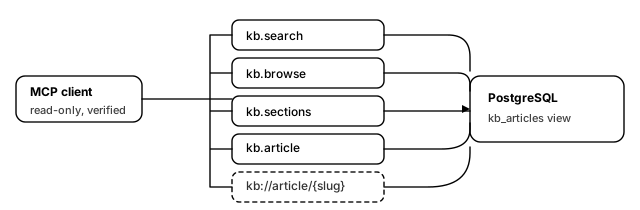
Your documentation is already in a database, and your agents cannot read it. This template exposes it: four read-only tools and a browsable resource template over one view, with nothing in the config that can write.
What you get
- **
kb.search** — find articles whose title or body contains the query. Comes back with a 400-character extract per hit, newest first, capped at 25. Short enough that an agent can scan the list before committing context to one article. - **
kb.browse** — list one section, newest first. - **
kb.sections** — every section with an article count. The tool an agent calls when it does not yet know the vocabulary. - **
kb.article** — the full text of one article by slug. - **
kb://article/{slug}** — the same articles as MCP resources, so a client can attach one to a conversation directly.resources/listpages the whole base with a keyset cursor, which stays fast as the base grows.
Why the split between search and article matters: an agent that can only fetch whole articles will pull three of them to answer one question, and two of those will be wasted context. The extract in kb.search is what lets it choose.
What you need
- A PostgreSQL database the gateway can reach, holding your articles. You will fill in four fields about it: PostgreSQL host and port, Database name, Database user, and Database password.
- An OpenID Connect provider, for the Identity provider issuer, Token audience and JWKS endpoint fields.
- **A view called
kb_articles** with five columns. You almost certainly do not want to rename your tables to match this template — write a view instead:
CREATE VIEW kb_articles AS
SELECT
  a.slug        AS slug,        -- unique, stable, URL-safe
  a.title       AS title,
  s.name        AS section,
  a.body_md     AS body,        -- Markdown; served as text/markdown
  a.updated_at  AS updated_at
FROM articles a
JOIN sections s ON s.id = a.section_id
WHERE a.published;              -- the view is also your publication filter
Then grant the role nothing but read:
GRANT SELECT ON kb_articles TO mcpg_kb_reader;The WHERE clause is worth dwelling on. Because every tool reads the view and never the underlying tables, the view is the only place that decides what is publishable — you cannot leak a draft by forgetting a filter in one of five queries.
How it works
Each tool is one dev.mcpg.backend.sql binding running one statement against a shared pool. Every query carries read_only: true, which the driver enforces as a read-only transaction where the engine supports it, and every value is a bound parameter rather than interpolated text.
kb.search matches with title ILIKE '%' || :query || '%'. The concatenation happens in SQL, on a parameter, so a query containing % or a quote is matched literally rather than changing the statement.
The resource template does two different jobs with two different queries. The read query returns uri, text and mime_type columns and declares row_mode: resource_contents, so the plugin assembles the resources/read response shape rather than you hand-writing json_build_object. The list_query enumerates the base for resources/list, paged with mode: keyset on slug — every page is an indexed seek rather than an OFFSET scan that gets slower the deeper a reader goes.
The first five minutes after it boots
- Call
kb.sections. If it returns your section names, the view, the credentials and the network path are all correct at once. - Call
kb.searchfor a word you know appears in exactly one article. Check the extract is readable — if it is cut mid-word, that is the 400-character truncation, not a bug. - Call
kb.articlewith the slug from that result and confirm the body is complete. - Ask the client to list resources. You should see article titles, paged 100 at a time.
- Try to write: there is no tool that can. Confirm the database role also cannot, with
psql -c "insert into kb_articles ...", which should be refused.
Notes
- This template is self-host only, deliberately. The SQL backend opens its connection pool and health-checks it while the binding registers, before any per-call credential is resolved. A managed-cloud render would hand the driver a connection string still carrying an unresolved token and the gateway would fail to boot. Run it yourself and export
PG_PASSWORDbefore starting. - **
dev.mcpg.backend.sqlis not baked into the published gateway images.** It is pulled fromghcr.io/mcpg-dev/plugins/backend-sqlat boot, so the host needs registry access on first start, or a configured mirror. - Substring search has a ceiling.
ILIKE '%…%'cannot use a plain B-tree index. Up to a few tens of thousands of articles it is fine; past that, addpg_trgmand a GIN index, or atsvectorcolumn, and change theWHEREin one statement. The tool contract does not move. - Slugs are the public identifier. They appear in every resource URI, so changing one breaks any conversation that cited it. Treat them as permanent.