Support Desk
Communication
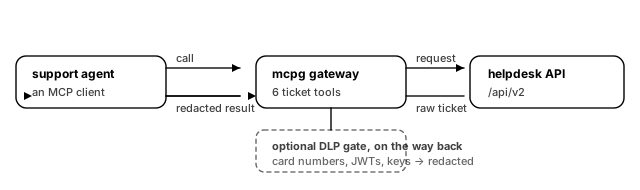
Support work is mostly reading: find the ticket, read the history, find the customer, then write one careful reply. This template gives an agent those six moves against your helpdesk, and strips card numbers and API keys out of the answers on the way back.
What you get
Six tools, split cleanly between the ones that read and the ones that are seen by a customer.
Reading, all annotated read_only:
- **
tickets.search** — free-text search across tickets. The cheapest way to find out whether this customer has written in before. - **
tickets.get** — one ticket with its full comment history. - **
customers.lookup** — the customer behind an email address: plan, open tickets, the account to bill against.
Acting:
- **
tickets.reply** — post a comment.public: truesends it to the customer and cannot be unsent;public: falseleaves an internal note. The field is required, so the agent has to decide rather than inherit a default. - **
tickets.set_status** — move a ticket betweenopen,pending,holdandsolved. Solving usually triggers the satisfaction survey, which is why it is a separate tool and not a flag on the reply. - **
tickets.escalate** — hand the ticket to the on-call queue with a written reason. The escape hatch that keeps an agent from guessing.
And one thing worth adding on day two:
- Redaction on the way back. Customers paste card numbers, JWTs and cloud keys into tickets. A DLP gate can rewrite those out of the response before the model sees them. It is a licensed plugin rather than part of the base template — the exact block to paste is under Notes.
What you need
- A helpdesk with a Zendesk-shaped REST API. You will fill in Helpdesk API host and a Helpdesk API token for a service agent account. Give it the ticket scopes only; none of these tools touch billing or admin.
- An OpenID Connect provider, for the Identity provider issuer, Token audience and JWKS endpoint fields. Every ticket edit is attributable to a real credential, which is what makes the audit log worth keeping.
If your helpdesk is not Zendesk, the paths are the only thing that differ. The six URLs in the config are the whole integration surface; point them at your own and nothing else changes.
How it works
Each tool is one dev.mcpg.backend.http binding. The method decides how arguments travel: GET bindings send them as a query string, POST bindings send them as a JSON body. Path parameters are interpolated from ${arguments.…} — a CEL segment the gateway evaluates per call, so a ticket id lands in the path and nowhere else.
The token never appears in the config text you edit. It is written as ${var.HELPDESK_TOKEN} and, on a cloud publish, becomes a ${cred://…} reference resolved per request through the credential issuer. Rotating it does not mean re-publishing the config.
The first five minutes after it boots
- Call
tickets.searchwith a query you know matches. If it returns, your host and token are correct and the other five share both. - Call
tickets.geton a ticket you know has a long comment history. Watch for a truncated response — that is the 512 KiB cap, and it is the first thing to raise on a busy helpdesk. - Call
tickets.replywithpublic: false. Check the note appears in the helpdesk UI as internal, not customer-visible. - Call
tickets.escalateand confirm the on-call queue receives it. - Read the audit log. Every call above should appear with the subject of the credential that made it.
Notes
- **
dev.mcpg.backend.httpships inside the published gateway images**, so the base template needs no plugin pull at boot beyond the credential issuer a cloud publish adds for you. - Adding redaction.
dev.mcpg.tool-gate.dlpis BUSL-1.1 and needs thedlpplan feature; a community license refuses to boot with it. On a plan that grants it, add this toplugins:— nothing else changes, because a tool gate sits in the call chain rather than in any one binding:
  - id: dev.mcpg.tool-gate.dlp
    class: tool_gate
    source: { oci: "ghcr.io/mcpg-dev/plugins/tool-gate-dlp:protocol-1" }
    config:
      pre_execution: true
      post_execution: true
      action: redact
      redact_placeholder: "[redacted by mcpg]"
      detectors: [credit_card, jwt, aws_access_key, aws_secret_key, generic_api_key, url_credentials]
      validate_credit_card_luhn: true
action: redact rather than block, because an agent told "denied" learns nothing while an agent that sees [redacted by mcpg] knows what happened. email is deliberately not in the detector list — the address is the thing the agent is working with. Redaction is a safety net, not a control: it catches the shapes it knows, and it will not catch a home address written out in prose.
- Response caps are generous but real.
tickets.searchandtickets.getcap at 512 KiB. A ticket with a hundred comments can exceed that; raisemax_response_byteson that binding rather than removing the cap. - Nothing here deletes. There is no tool to delete a ticket or a comment, on purpose. Add one only if you also add an approval gate in front of it.