Web Reader
Developer tools
Agents are bad at reading HTML and worse at reading PDFs, and the usual fix — paste the page in — spends thousands of tokens on navigation chrome. This template converts a page or a document to clean Markdown server-side, and hands back only the text.
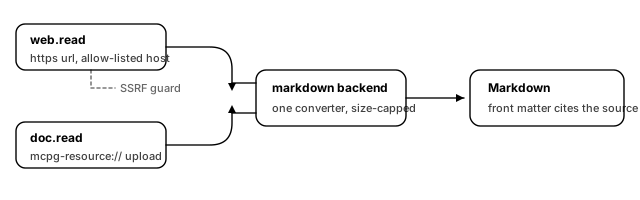
What you get
Two tools over one converter.
- **
web.read** — fetch one URL and return it as Markdown: headings, lists, tables and links kept; scripts, styling and navigation dropped. The response carries YAML front matter naming the source, so a model quoting the page can cite where the text came from. - **
doc.read** — convert a document already held by the gateway's content store: PDF, Word, spreadsheet, archive. Pass themcpg-resource://URI the upload returned. The bytes are read server-side and never travel through the conversation.
The security posture is the point of the template, not a footnote:
- **
web.readfetches only allow-listed hosts.** A tool that fetches a caller-supplied URL is a request your gateway makes, from inside your network, on somebody else's instruction. The allow-list is what stops that being a problem, and it starts with exactly one host. - Private and link-local addresses are refused even for an allow-listed host, which is what closes
169.254.169.254and the rest of the metadata surface. - Everything is size-capped: input, output, decompressed bytes, nesting depth, embedded documents, table rows and wall-clock time. A zip bomb trips the expansion ceiling rather than the input one.
What you need
- A host worth reading, in the Host the reader may fetch field. One hostname, and only that hostname, becomes reachable through
web.read. - An OpenID Connect provider, for the Identity provider issuer, Token audience and JWKS endpoint fields.
That is all. There are no secrets in this template and no upstream account to create — which also means nothing to rotate and nothing to leak.
To allow a second host, add it to the list after you download or publish:
url:
  allow_hosts: ["docs.example.com", "status.example.com"]
An empty list means any host that passes the address guard. That is a real configuration, and it is the wrong one for a gateway your agents can reach.
How it works
Both tools are dev.mcpg.backend.markdown bindings, differing only in which input modes they enable. web.read sets sources.url: true and leaves inline and resource off; doc.read does the opposite. A binding that enables url without the network_outbound capability grant is refused at boot rather than quietly failing to fetch — the grant in plugins[] is load-bearing.
The converter parses the document into blocks and renders those blocks as Markdown, rather than running a regex over HTML. That is why a table survives as a table and a code block survives as a code block. preserve_unsupported_html is off, so anything the parser cannot model is dropped with a warning instead of being passed through as raw markup a model then has to ignore.
The two bindings carry different limits on purpose. web.read caps output at 1 MiB and finishes in 30 seconds, because a page that needs more than that is a page an agent should not be reading whole. doc.read allows 4 MiB and a minute, because a real PDF earns it.
The first five minutes after it boots
- Call
web.readon a page on your allow-listed host. Check the front matter at the top names the URL you asked for. - Call
web.readon a host that is not allow-listed. It should be refused. If it is not, the allow-list did not render — check the config. - Call
web.readonhttp://169.254.169.254/. It should be refused twice over: wrong host, private address. - Upload a PDF through your client and call
doc.readwith the returnedmcpg-resource://URI. Confirm the headings survived. - Try a large document and watch it truncate at a block boundary rather than mid-sentence — that is
max_output_bytesdoing its job.
Notes
- **
dev.mcpg.backend.markdownis not baked into the published gateway images.** It is pulled fromghcr.io/mcpg-dev/plugins/backend-markdownat boot, so the host needs registry access on first start, or a configured mirror. - **
doc.readneeds a content store with something in it.** The gateway creates an in-process store by default, which is enough to try the tool but is lost on restart. Pointstorage.providersat a filesystem or S3 provider before you rely on it. - The allow-list is per binding, not per gateway. If you add a third tool later, it gets its own list. That is deliberate: one tool that may reach a vendor's docs should not implicitly let another reach them too.
- This template has no upstream credential, so there is no
cred://reference and no credential issuer in a cloud publish. It is the simplest thing in the gallery to get running, and a reasonable first thing to try.